framework 13 review
hands-on review of the framework laptop 13 — build quality, repairability, linux support, and whether the modular dream holds up.
tl;dr:
- ok battery life
- ok display
- fantastic keyboard, better than my macbook
- 3:2 aspect ratio is awesome
- performance is ok. cpu is great, gpu is awful
- USB4 support / PCIe Tunneling
- build is slightly worse than a macbook air (way better than framework 16)
screen
i have the 2.2k panel. i took one look at the rounded corners on the 2.8k display and how it leaves a small gap at the top corners and couldn’t unsee it. the 2.8k display also has worse color accuracy, more ghosting, and a higher response time. i think it’s more of a side-grade than an upgrade.
after you install a color profile, the colors are quite decent. also had an annoying issue where the lowest power profile would mess with the brightness of the display and everything would look washed out. the fix
60hz is not really that much of a dealbreaker. i don’t really notice that its low-refresh rate 90% of the time.
the screen is also very bright. ~450 nits!
performance
total power draw is about ~50W between the cpu and gpu. the gpu can pull 40W at full utilization. the cpu pulls about 40W as well (but not at the same time).
cpu
8c/16t ai 7 350 is actually decent. things compile fast-ish for a laptop. no complaints here.
integrated gpu
slow. very slow.

you basically can’t do any real gpu work on the iGPU. elden ring runs at 40fps on the absolute lowest settings.
these laptops are RDNA3.5, and have ROCm support (sudo dnf install rocm* will install 6.4). very nice for learning the amdgpu stack.
fan noise
it’s mostly silent when you’re using it normally (as long as the bottom vents are uncovered). the fan never runs longer than it needs to. awesome job here.
battery life
idle power is not great. i have vs code, chrome, and ghostty open, and i’m in the lowest power profile. 45% screen brightness.
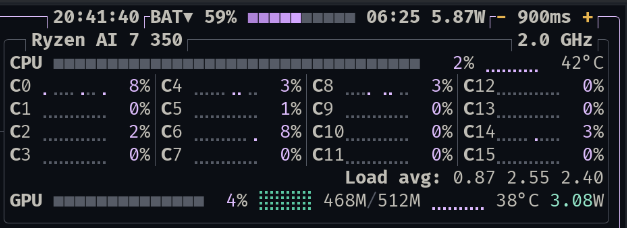
best case is 5.5 to 6W, which gives you about 10 hours of battery life. the catch is that in this power profile, the max cpu freq has been massively reduced. the computer is noticeably slower.
in the middle and performance power profiles, idle is ~7.5W (8 hours). still quite reasonable.
cpu/gpu performance on battery vs plugged in is identical!
random things
keyboard brightness
the lowest keyboard brightness is too bright. it looks super cool with the transparent keyboard option, but in a completely dark room it will blind you.
fingerprint
super reliable, no issues.
trackpad
forgettable.
removable ports
this is actually sort of useful. usb-c charging on both sides, and i can add a usb-a or hdmi port without much hassle.
aesthetics
top-tier. noobs can’t use the translucent keyboard, and the translucent purple bezel and ports are fantastic. super unique looking laptop, especially if you can put a dbrand skin on the top.
why buy one?
the cost to upgrade is quite high. the HX 370 motherboard itself is $999! imagine how expensive the next-gen top-end motherboard would be. it’s almost cheaper to buy a whole new laptop.
soldered memory is going to be standard going forward. newer AMD cpus like strix halo are requiring soldered memory (see framework desktop), and that reduces the upgradeability of the laptop. the memory bandwidth on this laptop (dual channel ddr5-5600 — 89GB/s) is one of the main reasons the GPU is so slow. Strix Halo with LPDDR5X-8000 in contrast gets ~256 GB/s — nearly 3x — which is why its iGPU is in a different league.
i don’t really see the case for buying a framework because it’s a framework. buy it because it’s a decent laptop. most other laptops miss out on a core area that makes it a terrible experience. i don’t feel this way with the framework 13.
- zephyrus g14/g16: questionable PCIe tunneling support, poor battery life, screen is less bright, 16:10 aspect ratio, nvidia gpu + linux
- zenbook s16: display is very dim, and you only get 24GB ram with the HX370 (32 would be ideal)
- new-gen thinkpad: honestly, haven’t tried this one. but it’s expensive, not in the same price bracket as the framework 13 (bring your own ram+ssd, i bought before the shortage :))
- macbook air/used pro: doesn’t run linux, disqualified.
- hp zbook g1a: $2,000! probably an all around better laptop than the fw13, but almost double the price.
aside: framework desktop and home ai box alternatives
saw a lot of people buying framework desktops for AI on twitter, and frankly it doesn’t make sense to me. 250GB/s memory bandwidth? RX 7600 class peformance? the only models that run somewhat well on it are MoE models. every dense model is under 10k/s, which is unusable.
training models on it (from scratch) is also impossible. it would take weeks to train anything decent.
- open source models (that you can run at usable speeds) aren’t good yet. just pay the $20/mo and enjoy while it’s cheap.
alternatives
2x 3090 / amd epyc - $4000 ish?
add 2 more 3090s - $5500. you have 96GB of much faster VRAM, and a half-decent training setup.
with a good motherboard, you can potentially have 6 3090s, 144GB of fast VRAM.
you can undercut the tinybox prices by ~20%, as long as you’re willing to sink hours into troubleshooting, setup and building. The tinybox red is 6x 7900 XTX, which is a fundamentally better architecture for this use case than 3090s — more memory bandwidth and better ROCm support on recent builds.
all better options than spending $2,000 on a machine that does AI poorly. save that for a future 3090 machine!